Anleitung (VisualStudio) code
Download und Installation
- Download Download Visual Studio Code (Richtiges Betriebssystem wählen!)
- Installation Code (normalerweise einfach Doppelklick und Anweisungen folgen)
- Die beiden Optionen “Add … im Kontextmenü” hinzufügen
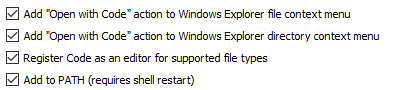
- Code gleich wieder schliessen
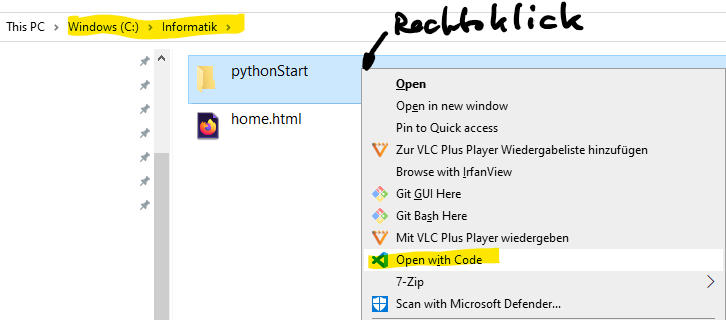
- Wechsel in das Informatik Projektverzeichnis (z.B. c:\informatik\pythonStart\), starten von Code aus den Kontextmenu
- Betätigen, dass man dem Autor in diesem Verzeichnis vertraut:
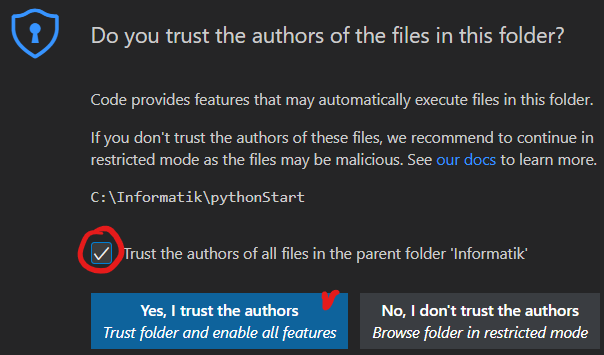 .
. - Installation aller empfohlenen Code Extensions oder


Vorschlag zu Code Extensions für das GLF Informatik
Kopieren Sie das folgende File in das Verzeichnis c:\Users\IHRNAME\.vscode
- extensions.json
{
	// See https://go.microsoft.com/fwlink/?LinkId=827846 to learn about workspace recommendations.
	// Extension identifier format: ${publisher}.${name}. Example: vscode.csharp
	// List of extensions which should be recommended for users of this workspace.
	"recommendations": [
		"ms-python.isort",
		"ms-python.python",
		"ms-python.vscode-pylance",
		"dphans.micropython-ide-vscode",
		"ev3dev.ev3dev-browser",
		"James-Yu.latex-workshop",
		"lego-education.ev3-micropython",
		"mechatroner.rainbow-csv",
		"yzhang.markdown-all-in-one",
		"cweijan.vscode-typora",
		"yzane.markdown-pdf"
	],
	// List of extensions recommended by VS Code that should not be recommended for users of this workspace.
	"unwantedRecommendations": [
		"ms-edgedevtools.vscode-edge-devtools",
		"ms-vscode.notepadplusplus-keybindings"
	]
}
Die vorgeschlagenen Erweiterungen stehen dann im Extension Pane unter RECOMMANDED zur Auswahl und Sie können diese installieren.